Desktop Computers

Kajiimagi

<Aristocrat╭ರ_•́>
4,810
8,913
Strange occurrence that I've delt with for a month or two and just resolved.

So I have a newer computer. I decided it was time to finally use Windows 11, and my older PC was getting worn, so I went new instead of reusing any of my old parts.
It was a box computer, as opposed to something that I was doing all the work to install parts and such. But yeah, new computer using Intel & GeForce. Also a bunch of SSD's for speed.

Ever since I installed a new mouse (Logitech MX Master 3S, I noticed that the mouse would randomly start jumping instead of moving smooth. Almost like the HDD was extremely overburdened, so it couldn't display the mouse's actual location in real time. An odd thing, but if I would physically power the mouse down and turn it back on (a toggle switch on the bottom), it would continue jumping. So I would reset it quite often. Multiple times throughout the day.
Next up, I got a new Win 11 update patch, and suddenly my internet started getting very slow. Strange, because the internet had a strange lag prior to turning my VPN on full time. Then it started to go quick again, until this update caused it to go really delayed, even with the VPN permanently enabled.

So yeah, very strange coincidence. Installing new drivers and reinstalling software didn't seem to work either. I was almost at the point where I was going to just outright return the PC and call it a day. Then, for no reason yesterday, I decided to unplug the dongle that powers the mouse. I was going to connect it to the PC via Bluetooth instead, but it just wouldn't pair for whatever reason. I could see it on the pairing list, but no matter how many times I tried, it wouldn't pair. Kept saying to try again.

Out of frustration, I decided to plug my dongle back into the PC, but I used a different port. Specifically, one on the front of the computer, as opposed to the back. Suddenly, everything runs great once more. The dongle used to be on a USB 2.3 port right next to the cat8 cable I'm using. Now they are a 16 inches apart from one another. The mouse is running better than I ever experienced it, and also the internet is going extremely quick without timing out. I have no idea how this dongle could have been causing the problem, but all is good once more in the world. Just thought I would share my experience with you guys.
yeah I've noticed that from back in the day when USB was introduced. Cannot explain why , maybe the signal the dongle is using is getting interference?
 

Lanx

<Prior Amod>
74,877
177,247
Strange occurrence that I've delt with for a month or two and just resolved.

So I have a newer computer. I decided it was time to finally use Windows 11, and my older PC was getting worn, so I went new instead of reusing any of my old parts.
It was a box computer, as opposed to something that I was doing all the work to install parts and such. But yeah, new computer using Intel & GeForce. Also a bunch of SSD's for speed.

Ever since I installed a new mouse (Logitech MX Master 3S, I noticed that the mouse would randomly start jumping instead of moving smooth. Almost like the HDD was extremely overburdened, so it couldn't display the mouse's actual location in real time. An odd thing, but if I would physically power the mouse down and turn it back on (a toggle switch on the bottom), it would continue jumping. So I would reset it quite often. Multiple times throughout the day.
Next up, I got a new Win 11 update patch, and suddenly my internet started getting very slow. Strange, because the internet had a strange lag prior to turning my VPN on full time. Then it started to go quick again, until this update caused it to go really delayed, even with the VPN permanently enabled.

So yeah, very strange coincidence. Installing new drivers and reinstalling software didn't seem to work either. I was almost at the point where I was going to just outright return the PC and call it a day. Then, for no reason yesterday, I decided to unplug the dongle that powers the mouse. I was going to connect it to the PC via Bluetooth instead, but it just wouldn't pair for whatever reason. I could see it on the pairing list, but no matter how many times I tried, it wouldn't pair. Kept saying to try again.

Out of frustration, I decided to plug my dongle back into the PC, but I used a different port. Specifically, one on the front of the computer, as opposed to the back. Suddenly, everything runs great once more. The dongle used to be on a USB 2.3 port right next to the cat8 cable I'm using. Now they are a 16 inches apart from one another. The mouse is running better than I ever experienced it, and also the internet is going extremely quick without timing out. I have no idea how this dongle could have been causing the problem, but all is good once more in the world. Just thought I would share my experience with you guys.

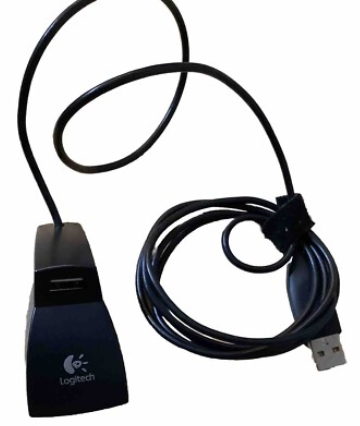
logitech used to bundle this extension just for that
82a2986a684328b16afd388302882927.png


but now that their mice are multi connected, either logi bolt or bt, they don't bother no more and you could have connected w/ bt to avoid the issue as well.
 

Xarpolis

Life's a Dream
16,212
18,343
logitech used to bundle this extension just for that
82a2986a684328b16afd388302882927.png


but now that their mice are multi connected, either logi bolt or bt, they don't bother no more and you could have connected w/ bt to avoid the issue as well.
I tried connecting with BT. Every time I tried it said it was unable to connect, and to try again. That's what lead me to changing the location of the bolt dongle.
 

Control

Golden Baronet of the Realm
5,522
15,653
Yeah, we have a ton of issues here with usb ports and hubs getting wonky. Have never found a good solution other than rearranging plugs or replacing wires/hubs until shit starts working again.
 

Rabbit_Games

Ahn'Qiraj Raider
2,335
5,059
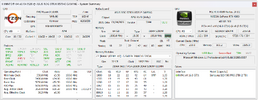
Anyone up-to-date on BIOS settings? I'm trying to optimize my setup while remaining stable.
 

Attachments

  • System-202603121430.png
    System-202603121430.png
    129.7 KB · Views: 5

Neranja

<Bronze Donator>
3,166
5,170
Anyone up-to-date on BIOS settings? I'm trying to optimize my setup while remaining stable.
First, save your current BIOS settings in a profile, and look for a software to really check stability under load. People have used Prime95, AIDA64, Cinebench R23. There are other tools like OCCT.

In BIOS:
1. Maybe increase base clock from 100 to 101 (but no more than 103)
2. Set Curve Optimizer:
- Locate PBO, like Advanced/AMD Overlocking/Precision Boost Overdrive
- Select "Curve Optimizer"
- Set All Cores, Negative, Start with 15 or so (effective -15).

Check if it still boots, check stability (at least 10 minutes). If it works you can re-enter the BIOS and increase the negative offset. This is called "undervolting", and where the term "silicon lottery" comes into play. You can try up to 30, but that's rarely stable.

The theory behind all this: Modern CPUs automatically overclock themselves to their limit, so you reduce the amount of energy that is pumped into the CPU as a baseline, so in turn it has more thermal headroom for overclocking under load. Due to production tolerances CPUs need different minimum energy to work properly.

If you have copious amounts of time to waste you can also individually undervolt each core, but it is rarely worth the effort.

You can do this on the fly with the AMD Ryzen Master tool, too, but setting it up in BIOS is easier and long-term.

There are lots of YouTube videos that show you the process.