Desktop Computers

Kajiimagi

<Aristocrat╭ರ_•́>
4,903
9,066
Strange occurrence that I've delt with for a month or two and just resolved.

So I have a newer computer. I decided it was time to finally use Windows 11, and my older PC was getting worn, so I went new instead of reusing any of my old parts.
It was a box computer, as opposed to something that I was doing all the work to install parts and such. But yeah, new computer using Intel & GeForce. Also a bunch of SSD's for speed.

Ever since I installed a new mouse (Logitech MX Master 3S, I noticed that the mouse would randomly start jumping instead of moving smooth. Almost like the HDD was extremely overburdened, so it couldn't display the mouse's actual location in real time. An odd thing, but if I would physically power the mouse down and turn it back on (a toggle switch on the bottom), it would continue jumping. So I would reset it quite often. Multiple times throughout the day.
Next up, I got a new Win 11 update patch, and suddenly my internet started getting very slow. Strange, because the internet had a strange lag prior to turning my VPN on full time. Then it started to go quick again, until this update caused it to go really delayed, even with the VPN permanently enabled.

So yeah, very strange coincidence. Installing new drivers and reinstalling software didn't seem to work either. I was almost at the point where I was going to just outright return the PC and call it a day. Then, for no reason yesterday, I decided to unplug the dongle that powers the mouse. I was going to connect it to the PC via Bluetooth instead, but it just wouldn't pair for whatever reason. I could see it on the pairing list, but no matter how many times I tried, it wouldn't pair. Kept saying to try again.

Out of frustration, I decided to plug my dongle back into the PC, but I used a different port. Specifically, one on the front of the computer, as opposed to the back. Suddenly, everything runs great once more. The dongle used to be on a USB 2.3 port right next to the cat8 cable I'm using. Now they are a 16 inches apart from one another. The mouse is running better than I ever experienced it, and also the internet is going extremely quick without timing out. I have no idea how this dongle could have been causing the problem, but all is good once more in the world. Just thought I would share my experience with you guys.
yeah I've noticed that from back in the day when USB was introduced. Cannot explain why , maybe the signal the dongle is using is getting interference?
 

Lanx

<Prior Amod>
75,212
177,826
Strange occurrence that I've delt with for a month or two and just resolved.

So I have a newer computer. I decided it was time to finally use Windows 11, and my older PC was getting worn, so I went new instead of reusing any of my old parts.
It was a box computer, as opposed to something that I was doing all the work to install parts and such. But yeah, new computer using Intel & GeForce. Also a bunch of SSD's for speed.

Ever since I installed a new mouse (Logitech MX Master 3S, I noticed that the mouse would randomly start jumping instead of moving smooth. Almost like the HDD was extremely overburdened, so it couldn't display the mouse's actual location in real time. An odd thing, but if I would physically power the mouse down and turn it back on (a toggle switch on the bottom), it would continue jumping. So I would reset it quite often. Multiple times throughout the day.
Next up, I got a new Win 11 update patch, and suddenly my internet started getting very slow. Strange, because the internet had a strange lag prior to turning my VPN on full time. Then it started to go quick again, until this update caused it to go really delayed, even with the VPN permanently enabled.

So yeah, very strange coincidence. Installing new drivers and reinstalling software didn't seem to work either. I was almost at the point where I was going to just outright return the PC and call it a day. Then, for no reason yesterday, I decided to unplug the dongle that powers the mouse. I was going to connect it to the PC via Bluetooth instead, but it just wouldn't pair for whatever reason. I could see it on the pairing list, but no matter how many times I tried, it wouldn't pair. Kept saying to try again.

Out of frustration, I decided to plug my dongle back into the PC, but I used a different port. Specifically, one on the front of the computer, as opposed to the back. Suddenly, everything runs great once more. The dongle used to be on a USB 2.3 port right next to the cat8 cable I'm using. Now they are a 16 inches apart from one another. The mouse is running better than I ever experienced it, and also the internet is going extremely quick without timing out. I have no idea how this dongle could have been causing the problem, but all is good once more in the world. Just thought I would share my experience with you guys.

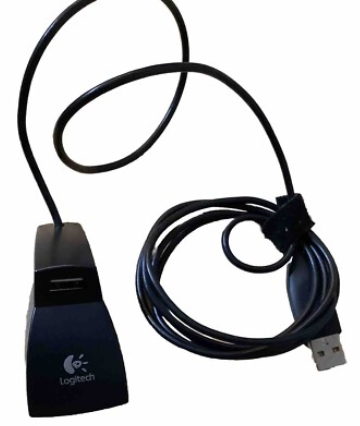
logitech used to bundle this extension just for that
82a2986a684328b16afd388302882927.png


but now that their mice are multi connected, either logi bolt or bt, they don't bother no more and you could have connected w/ bt to avoid the issue as well.
 

Xarpolis

Life's a Dream
16,235
18,379
logitech used to bundle this extension just for that
82a2986a684328b16afd388302882927.png


but now that their mice are multi connected, either logi bolt or bt, they don't bother no more and you could have connected w/ bt to avoid the issue as well.
I tried connecting with BT. Every time I tried it said it was unable to connect, and to try again. That's what lead me to changing the location of the bolt dongle.
 

Control

Golden Baronet of the Realm
5,530
15,669
Yeah, we have a ton of issues here with usb ports and hubs getting wonky. Have never found a good solution other than rearranging plugs or replacing wires/hubs until shit starts working again.
 

Sythrak

Vyemm Raider
539
1,343
Windows has a weird thing where it will assign anything USB a random ID. You can set a permanent one and it usually fixes some of the issues.
 
  • 1Like
Reactions: 1 user

Rabbit_Games

Ahn'Qiraj Raider
2,353
5,082
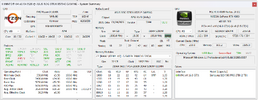
Anyone up-to-date on BIOS settings? I'm trying to optimize my setup while remaining stable.
 

Attachments

  • System-202603121430.png
    System-202603121430.png
    129.7 KB · Views: 13

Neranja

<Bronze Donator>
3,179
5,202
Anyone up-to-date on BIOS settings? I'm trying to optimize my setup while remaining stable.
First, save your current BIOS settings in a profile, and look for a software to really check stability under load. People have used Prime95, AIDA64, Cinebench R23. There are other tools like OCCT.

In BIOS:
1. Maybe increase base clock from 100 to 101 (but no more than 103)
2. Set Curve Optimizer:
- Locate PBO, like Advanced/AMD Overlocking/Precision Boost Overdrive
- Select "Curve Optimizer"
- Set All Cores, Negative, Start with 15 or so (effective -15).

Check if it still boots, check stability (at least 10 minutes). If it works you can re-enter the BIOS and increase the negative offset. This is called "undervolting", and where the term "silicon lottery" comes into play. You can try up to 30, but that's rarely stable.

The theory behind all this: Modern CPUs automatically overclock themselves to their limit, so you reduce the amount of energy that is pumped into the CPU as a baseline, so in turn it has more thermal headroom for overclocking under load. Due to production tolerances CPUs need different minimum energy to work properly.

If you have copious amounts of time to waste you can also individually undervolt each core, but it is rarely worth the effort.

You can do this on the fly with the AMD Ryzen Master tool, too, but setting it up in BIOS is easier and long-term.

There are lots of YouTube videos that show you the process.
 

Flipmode

EQOA Refugee
2,122
351
Strange occurrence that I've delt with for a month or two and just resolved.

So I have a newer computer. I decided it was time to finally use Windows 11, and my older PC was getting worn, so I went new instead of reusing any of my old parts.
It was a box computer, as opposed to something that I was doing all the work to install parts and such. But yeah, new computer using Intel & GeForce. Also a bunch of SSD's for speed.

Ever since I installed a new mouse (Logitech MX Master 3S, I noticed that the mouse would randomly start jumping instead of moving smooth. Almost like the HDD was extremely overburdened, so it couldn't display the mouse's actual location in real time. An odd thing, but if I would physically power the mouse down and turn it back on (a toggle switch on the bottom), it would continue jumping. So I would reset it quite often. Multiple times throughout the day.
Next up, I got a new Win 11 update patch, and suddenly my internet started getting very slow. Strange, because the internet had a strange lag prior to turning my VPN on full time. Then it started to go quick again, until this update caused it to go really delayed, even with the VPN permanently enabled.

So yeah, very strange coincidence. Installing new drivers and reinstalling software didn't seem to work either. I was almost at the point where I was going to just outright return the PC and call it a day. Then, for no reason yesterday, I decided to unplug the dongle that powers the mouse. I was going to connect it to the PC via Bluetooth instead, but it just wouldn't pair for whatever reason. I could see it on the pairing list, but no matter how many times I tried, it wouldn't pair. Kept saying to try again.

Out of frustration, I decided to plug my dongle back into the PC, but I used a different port. Specifically, one on the front of the computer, as opposed to the back. Suddenly, everything runs great once more. The dongle used to be on a USB 2.3 port right next to the cat8 cable I'm using. Now they are a 16 inches apart from one another. The mouse is running better than I ever experienced it, and also the internet is going extremely quick without timing out. I have no idea how this dongle could have been causing the problem, but all is good once more in the world. Just thought I would share my experience with you guys.

This exact same thing happened to me. Same mouse. Same dongle. The cause ended up being the dongle was too close to the WiFi antenna and kept causing interference. Once I move the dongle away, smooth as silk.
 

Borzak

<Bronze Donator>
28,439
38,419
Got my Franken computer finished. Parts from here and there. 7800x3d, 5070ti , Gigabyte motherboard with 3 M.2 slots, 64gb memory though I have 98gb I don't need it and i t's a different speed which Im sure is not optimal if it even worked. I did replace the no name AIO with a Kraken 360mm AIO. I have a display on the pump head which is really handy considering the computer is out of sight where I sit. I am all set to play minecraft now lol.

The no name case is very heavy, all steel I think and tempered glass. A LOT I mean a lot of empty space mostly. But lots of fans and LEDs, 9 fans all LED which I can't see so that is fine.
 
  • 2Like
Reactions: 1 users

Jovec

?
933
552
Got my Franken computer finished. Parts from here and there. 7800x3d, 5070ti , Gigabyte motherboard with 3 M.2 slots, 64gb memory though I have 98gb I don't need it and i t's a different speed which Im sure is not optimal if it even worked. I did replace the no name AIO with a Kraken 360mm AIO. I have a display on the pump head which is really handy considering the computer is out of sight where I sit. I am all set to play minecraft now lol.

The no name case is very heavy, all steel I think and tempered glass. A LOT I mean a lot of empty space mostly. But lots of fans and LEDs, 9 fans all LED which I can't see so that is fine.

Congrats - a 7800X3D and a 5070ti is a very powerful system. Since you mentioned 3 NVMe slots, only 2 IIRC will connect directly to the CPU, the third runs through the chipset which shares bandwidth with the LAN and USB ports along with a few other things. I doubt it is noticeable outside of benchmarking, but you may want to give consideration to where you install your NVMe drive(s).
 

Borzak

<Bronze Donator>
28,439
38,419
Yeah I only have a boot drive in now. I have two other drives and not sure if I will put them in now or not. I have a NAS for mass storage.

I looked into Signal RGB and looks like I will just keep my computer where I can't see it which is the way it is now.
 
Last edited:

gak

<Gold Donor>
2,444
12,836
a.gif

AMD Unveils Ryzen 9 9950X3D2 Dual Edition CPU; New 16-Core Zen 5 Chip With 208 MB Cache

AMD has finally introduced the anticipated Ryzen 9 9950X3D2 processor, which couldn't see the official launch alongside Ryzen 7 9850X3D. The new Ryzen 9 9950X3D2 Dual Edition sits above the existing Ryzen 9 9950X3D chip, but has a major change in the specification. As announced by AMD, the Ryzen 9 9950X3D2 will boast a total of 208 MB of Cache.

This cache comes through a combination of 192 MB L3 + 16 MB L2 cache, which is the highest cache we have seen on a mainstream processor. Ryzen 9 9950X3D2 is AMD's flagship Zen 5 chip, featuring 16 cores and 32 threads, bringing an additional 64 MB L3 cache through a second 3D V-Cache chiplet. Unlike Ryzen 9 9950X3D and other X3D processors, the 9950X3D2 utilizes both CCDs to add more L3 cache for superior performance.

Architecture: Zen 5
Cores/Threads: 16/32
Base/Boost Clock: 4.3/5.6 GHz
L3 Cache: 192 MB
L2 Cache: 16 MB
TDP: 200W
 
  • 2Mother of God
Reactions: 1 users

Quevy

<Gold Donor>
5,870
20,666

Chip Selloff Deepens After Google Touts Memory Breakthrough (1)​

Summary by Bloomberg AI
  • Memory chip stocks extended their losses after Google publicized research on a new algorithm that could allow more efficient use of the storage needed for artificial intelligence development.
  • Google's TurboQuant algorithm can cut the amount of memory required to run large language models by at least a factor of six, reducing the overall cost of training artificial intelligence.
  • The new technology could alleviate the supply crunch, potentially pushing down prices, but some analysts believe it may be beneficial for memory makers in the longer term due to higher product adoption demand.
By Kurt Schussler and Debby Wu
(Bloomberg) -- Memory chip stocks extended their losses on Thursday after Alphabet Inc.’s Google publicized research on a new algorithm that could allow more efficient use of the storage needed for artificial intelligence development.
Samsung Electronics Co. and SK Hynix Inc., South Korean leaders in the market, both fell at least 6% in Seoul. In the US, Micron Technology Inc., Western Digital Corp. and Sandisk Corp. all slid at least 5% in US trading, after they closed lower on Wednesday.
Memory chip companies had been on a tear in recent months as surging investment in AI infrastructure led to shortages, triggering a spike in chip prices and profit. SK Hynix and Samsung shares had soared more than 50% this year through Wednesday, while long-time laggard Kioxia Holdings Corp. had more than doubled.
Google’s new technology could alleviate the supply crunch, potentially pushing down prices. The company publicized the research on X this week, although it had originally come out last year.
Google said its TurboQuant algorithm can cut the amount of memory required to run large language models by at least a factor of six, reducing the overall cost of training artificial intelligence. Investors may harbor concerns that could reduce hyperscalers’ need for memory, pushing down the prices for components that are also used in smartphones and consumer electronics.

Four hyperscalers, led by Amazon.com Inc. and Google, plan to spend about $650 billion this year to build data centers, scooping up Nvidia Corp.’s AI accelerators and related memory chips.
SK Group Chairman Chey Tae-won recently said that the memory chip crunch will last until 2030.
But Morgan Stanley analyst Shawn Kim wrote in a note the impact of Google’s research on the industry should be more positive because it affects a critical bottleneck. It improves the efficiency of what’s known as the key value cache used for inference, or running AI models.
“If models can run with materially lower memory requirements without losing performance, the cost of serving each query drops meaningfully, resulting in more profitable AI deployment,” he wrote.
Read More: Rampant AI Demand for Memory Is Fueling a Growing Chip Crisis
Like many of the bulls in the AI industry and analyst community, he cited a theory known as the Jevons Paradox. It’s a concept from an English economist about coal production stating that the more efficient technology becomes, the more demand will rise.
The 19th century premise was also cited by JPMorgan Chase & Co. and Citigroup Inc. JPMorgan analysts said that investors may take profits on the news, but there’s no near-term threat to memory consumption.
The tech community also brought up the same theory last year when DeepSeek’s low-cost AI model sparked fears of a reduced need for more advanced technology.
TurboQuant is positive for hyperscalers given the return on investment opportunity, Morgan Stanley’s Kim wrote. It may be beneficial for memory makers in the longer term, as “a lower cost per token can also lead to higher product adoption demand.”
The Google development may make “little difference to demand given the extreme supply constraints,” Ortus Advisors analyst Andrew Jackson wrote in a note on the data platform Smartkarma.
 

Lanx

<Prior Amod>
75,212
177,826

Chip Selloff Deepens After Google Touts Memory Breakthrough (1)​

Summary by Bloomberg AI
  • Memory chip stocks extended their losses after Google publicized research on a new algorithm that could allow more efficient use of the storage needed for artificial intelligence development.
  • Google's TurboQuant algorithm can cut the amount of memory required to run large language models by at least a factor of six, reducing the overall cost of training artificial intelligence.
  • The new technology could alleviate the supply crunch, potentially pushing down prices, but some analysts believe it may be beneficial for memory makers in the longer term due to higher product adoption demand.
not fooling me google, i've seen this before

s-l1200.jpg
 
  • 2Worf
  • 1Like
Reactions: 2 users