Routers & Other Networking Stuff

Kithani

Vyemm Raider
2,479
3,563
The device essentially lets you carry your home network with you when traveling without having to any extra work. It can be done with other routers, but you'd have to know a little bit about networking and vpns to set it up. The other thing I like about it is that it's has the dimensions of a credit card, well with the thickness of 3-4 credit cards, so it's very portable. Outside of that, it's underpowered relative to other cheaper solutions. I was able to buy it when it first came out, and kinda' like you, I mostly used at the airport. I'll probably use it when our family starts taking trips again.
May be dumb but why would I want this functionality?

In theory if I had an NAS or something I could access it? You’re still using whatever hotel internet at the end of the day right?
 

Rabbit_Games

Ahn'Qiraj Raider
2,710
5,725
Same with using Internet at home. You don't want them snooping on you.
With hotel Internet, you don't want the hotel or anyone else on their network snooping on you. Or accessing your system, etc.
Being able to access your home network is just a bonus.
 
  • 1Like
  • 1Truth!
Reactions: 1 users

Quevy

<Gold Donor>
7,001
23,161
May be dumb but why would I want this functionality?

In theory if I had an NAS or something I could access it? You’re still using whatever hotel internet at the end of the day right?
I think this would put you behind a firewall, and if you tunneled to you home, it would route internet through there. You're right, the use case is geared towards business were the traveling salesman or consultant needs to access the corporate network. I use it because it's small, and it gives me a firewall, so my device isn't visible to the public.
 
  • 1Like
Reactions: 1 user

Lanx

<Prior Amod>
77,250
182,114
I think this would put you behind a firewall, and if you tunneled to you home, it would route internet through there. You're right, the use case is geared towards business were the traveling salesman or consultant needs to access the corporate network. I use it because it's small, and it gives me a firewall, so my device isn't visible to the public.
bitch don't lie, you bought it cuz it was cool, like i did
 
  • 2Solidarity
Reactions: 1 users

Intrinsic

Person of Whiteness
<Gold Donor>
17,114
17,479
What about the Mudi 7? I’ve been thinking about something like this for work where I don’t always have customer WiFi or hotel WiFi sucks, etc. it is a little all-in-one for my taste but seems like it would work and only be one device.

 
  • 1Like
Reactions: 1 user

Sheriff Cad

scientia potentia est
<Nazi Janitors>
34,527
84,122
I think this would put you behind a firewall, and if you tunneled to you home, it would route internet through there. You're right, the use case is geared towards business were the traveling salesman or consultant needs to access the corporate network. I use it because it's small, and it gives me a firewall, so my device isn't visible to the public.
For corporate networks you use a VPN anyway, how does an additional device help that? This seems like a hardware VPN with wifi sharing capability, which seems like a super narrow use case. Yes you'd still be limited by whatever shitty hotel internet you were on.
 

Quevy

<Gold Donor>
7,001
23,161
For corporate networks you use a VPN anyway, how does an additional device help that? This seems like a hardware VPN with wifi sharing capability, which seems like a super narrow use case. Yes you'd still be limited by whatever shitty hotel internet you were on.
Correct. If the company uses unifi routers, them they can use the built in VPN. You can also use this as a router to put your devices behind a firewall. It's really only useful if you're in the unifi ecosystem.
 

Lanx

<Prior Amod>
77,250
182,114
Correct. If the company uses unifi routers, them they can use the built in VPN. You can also use this as a router to put your devices behind a firewall. It's really only useful if you're in the unifi ecosystem.
Whats more insufferable is the unify reddit. I saw a post mocking an ap installed on the wall. I am like wtf is wrong with this, and thesr unify faggots want the ap ceiling mount or horizontal wall mount only. Like da fuq these shits are omni directional, fucking hell this unify snobbery
 
  • 1Like
Reactions: 1 user

Quevy

<Gold Donor>
7,001
23,161
Whats more insufferable is the unify reddit. I saw a post mocking an ap installed on the wall. I am like wtf is wrong with this, and thesr unify faggots want the ap ceiling mount or horizontal wall mount only. Like da fuq these shits are omni directional, fucking hell this unify snobbery
I mean it is Reddit.
 

Intrinsic

Person of Whiteness
<Gold Donor>
17,114
17,479
Whats more insufferable is the unify reddit. I saw a post mocking an ap installed on the wall. I am like wtf is wrong with this, and thesr unify faggots want the ap ceiling mount or horizontal wall mount only. Like da fuq these shits are omni directional, fucking hell this unify snobbery
Yes but “omnidirectional” generally refers to radiation in a particular plane, usually azimuth, not equal in all 3D directions. So what they’re lazily arguing is that if you wall mount it you’ve changed the orientation of the radiation pattern to be “omnidirectional” up/down instead of spread across the house. Except Unifi doesn’t necessarily classify their antennas as omnidirectional and instead provide multiple views of the measured radiation pattern to determine placement. This includes 3D views, azimuth views and 0/45/90 degree elevation views.


It is pretty straightforward on their help article.
 
  • 1Like
Reactions: 1 user

Intrinsic

Person of Whiteness
<Gold Donor>
17,114
17,479
UniFi Design Center thing is pretty cool... uploaded my floorplan and traced the walls.

I need to add some attenuation objects like cabinets and maybe other random things. But otherwise seems pretty neat for planning. Showing the rack layout, port assignments, configuration settings. Had no idea this existed.

1783434691403.png


1783434748698.png
 
  • 1Like
Reactions: 1 user

Quevy

<Gold Donor>
7,001
23,161
UniFi Design Center thing is pretty cool... uploaded my floorplan and traced the walls.

I need to add some attenuation objects like cabinets and maybe other random things. But otherwise seems pretty neat for planning. Showing the rack layout, port assignments, configuration settings. Had no idea this existed.

View attachment 633445

View attachment 633446
Are you going to buy the rack from them too? I ended up getting a 24U rack for all my switches and servers. Have you looked into getting their g6 180 cameras, BTW? I'm waiting for them to restock them in Japan. Also, have you thought of getting the intercom viewer to go with the g6 entry? I bought 3 (one for each floor), but have yet to set up the set up the g6 entry pro. I'm laying down all the cabling myself. Even with conduits, it takes forever to fish the cable and ensure the connections are secure. It took 7 hours to rout 5 cables and put in 12 keystones and a few rj45 connectors.
 

Lanx

<Prior Amod>
77,250
182,114
Are you going to buy the rack from them too? I ended up getting a 24U rack for all my switches and servers. Have you looked into getting their g6 180 cameras, BTW? I'm waiting for them to restock them in Japan. Also, have you thought of getting the intercom viewer to go with the g6 entry? I bought 3 (one for each floor), but have yet to set up the set up the g6 entry pro. I'm laying down all the cabling myself. Even with conduits, it takes forever to fish the cable and ensure the connections are secure. It took 7 hours to rout 5 cables and put in 12 keystones and a few rj45 connectors.
how difficult is it to route thru paper walls?
 
  • 1Worf
Reactions: 1 user

Intrinsic

Person of Whiteness
<Gold Donor>
17,114
17,479
Are you going to buy the rack from them too? I ended up getting a 24U rack for all my switches and servers. Have you looked into getting their g6 180 cameras, BTW? I'm waiting for them to restock them in Japan. Also, have you thought of getting the intercom viewer to go with the g6 entry? I bought 3 (one for each floor), but have yet to set up the set up the g6 entry pro. I'm laying down all the cabling myself. Even with conduits, it takes forever to fish the cable and ensure the connections are secure. It took 7 hours to rout 5 cables and put in 12 keystones and a few rj45 connectors.

Yeah, on the back side that you can't see I have the G6 Entry, I thought I had two but maybe not, one for front door and one for garage door on back of house. I didn't look at the G6 Entry Pro because we aren't doing access control or anything like that and it just seemed like a better camera for $100+.

I still need to play with the cameras. Not sure if I end up using mostly bullets or a couple of turrets.

1783453894817.png
 
  • 1Like
Reactions: 1 user

Quevy

<Gold Donor>
7,001
23,161
how difficult is it to route thru paper walls?
I have a lot of vertical and horizontal runs. Also I'm new to all this, so I suck relative to precessional. I had to redo connectors several times due to poor connection, and it's always from an awkward positions.
 

Quevy

<Gold Donor>
7,001
23,161
Yeah, on the back side that you can't see I have the G6 Entry, I thought I had two but maybe not, one for front door and one for garage door on back of house. I didn't look at the G6 Entry Pro because we aren't doing access control or anything like that and it just seemed like a better camera for $100+.

I still need to play with the cameras. Not sure if I end up using mostly bullets or a couple of turrets.

View attachment 633462
Nice. The pro is also much bigger ace uglier than the non pro, too. I'm planning to add access control as well. We already have a smart door with steel or aluminum frame, so I can't add an electric strike. I have to build a micro controller add connect it to the door as home assistant to made it work. Thank goodness some jap, who is much smarter me, posted a walkthrough.
 
  • 1Like
Reactions: 1 user

Lanx

<Prior Amod>
77,250
182,114
I have a lot of vertical and horizontal runs. Also I'm new to all this, so I suck relative to precessional. I had to redo connectors several times due to poor connection, and it's always from an awkward positions.
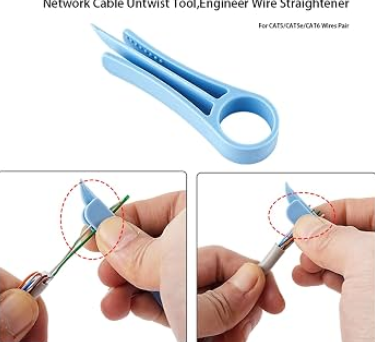
do you have trouble making the twisted pair straight? get a jewelry plier w/ nylon teeth
9a830bf89f956035d6fe374ff163dea6.jpg


they sell this shitty thing, that you can 3dprint
462996420b331276564bb01f6a81d5c4.png


but it's silly b/c you have to apply so much thumb pressure, whereas the pliers can use actual leverage

or are you using some sort of japan fiber
 

alavaz

Trakanon Raider
2,030
739
What about the Mudi 7? I’ve been thinking about something like this for work where I don’t always have customer WiFi or hotel WiFi sucks, etc. it is a little all-in-one for my taste but seems like it would work and only be one device.

I've been rocking the Mudi 2 for a couple of years. Works great with any SIM i've thrown in it. I actually like all of the GL products. I use the travel routers pretty extensively for work with various VPNs and they've all been solid.
 
  • 1Like
Reactions: 1 user