Computer Issues

Burren

Bronze Baronet of the Realm
5,549
8,730
sounds like you might have mouse drivers fucked

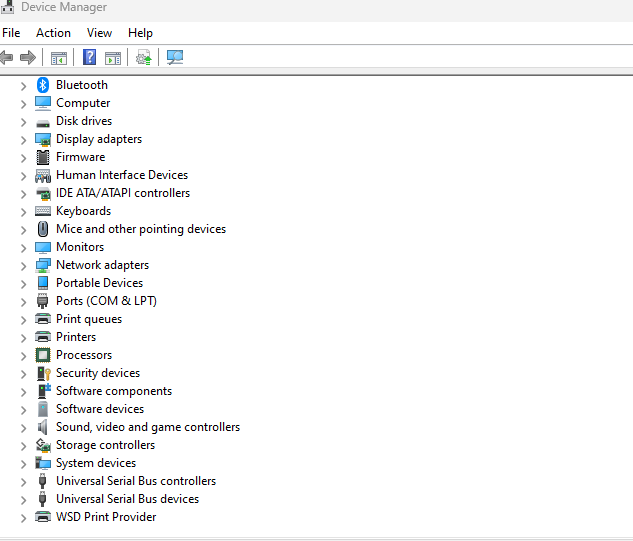
completely on keyboard do windowskey+r
type
device manager
enter
4fef6da335dda9c9bf29cdc06991e8f3.png

press tab

and you should be in the list with a dark bar

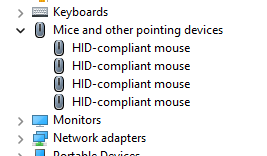
hit down until you land on mice

then hit right to expand the mice menu
61ee0ca47ef79a97fb45fb17c7693aac.png


hit delete on everything and reboot and windows should reinstall mice drivers


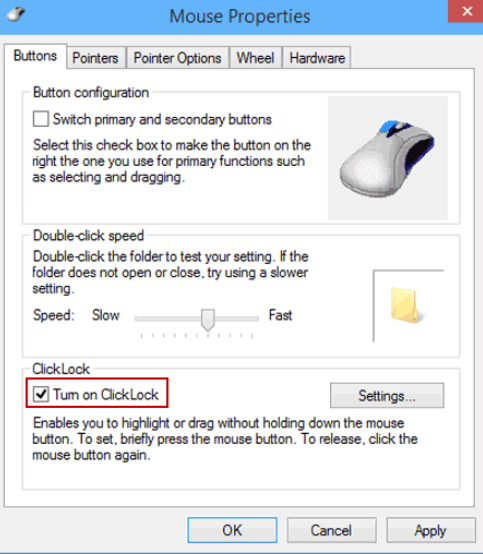
i mean it sounds like you might have a clicklock issue
ded2bc146085b13c2915c719271d260c.png

i had something like this happen a while ago, and just turned it off, no idea why it on in the first place, and no idea how youre gonna get to it without a mouse

I was able to see clicklock was not on, but I'll try the other steps you mentioned.
 

Burren

Bronze Baronet of the Realm
5,549
8,730
Mouse driver correct. Windows update done. Things will work for a minute then stop. If I go to task manager and end Windows Explorer it fixes the mouse operation and things are back to normal, but then it will get wonky all on its own.
 

Burren

Bronze Baronet of the Realm
5,549
8,730
Only right-click works. Can't left-click and moving cursor over icons does not highlight them like it should (on task bar, for instance).

ctrl, alt, delete and restart windows explorer will do a fix for 20-60 seconds then the mouse stops working again.

I did remove the mouse drivers and let the computer download again, but that didn't end up helping.
 

Lanx

<Prior Amod>
73,698
174,317
Only right-click works. Can't left-click and moving cursor over icons does not highlight them like it should (on task bar, for instance).

ctrl, alt, delete and restart windows explorer will do a fix for 20-60 seconds then the mouse stops working again.

I did remove the mouse drivers and let the computer download again, but that didn't end up helping.
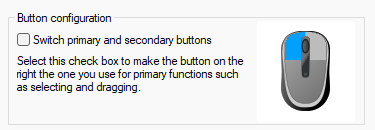
you don't have this clicked do you?
6cf1922f5dad21855b37dc117106b82f.png


make sure settings -bt and devices-mouse
46ccb382847ee3f563ba39c42f164881.png
 

Burren

Bronze Baronet of the Realm
5,549
8,730
you don't have this clicked do you?
6cf1922f5dad21855b37dc117106b82f.png
Nope.

It just works for a minute now, then stops working entirely, unless I reset Windows Explorer. Thinking I have to restore PC to a few days ago, or fresh install Windows.
 

Lanx

<Prior Amod>
73,698
174,317
Getting a new laptop for Christmas, anyone have a guide for debloating/configuring a fresh Windows 11?
 
  • 1Like
Reactions: 1 user