Computer Issues

Control

Golden Baronet of the Realm
5,347
15,198
Little annoying issue popping up on my desktop I use for work that I haven’t really tried to figure out yet. It is my old gaming PC that I moved over to work desk when I updated to my 9800X3D and 9070XT. So this one is i7 and 3080 TI.

Anyways, I do a lot of copy and paste between Excel, PowerBI, Smartsheet, Word, etc. it isn’t often large things, happens with a single cell contents. But very often the whole computer lags for like 8 seconds as soon as I CTRL + C. It happens frequently enough that it makes working almost unbearable. All I can correlate it with is that usually it happens when I’m watching Netflix or some embedded media in another tab. Almost always have something in in the background. Doesn’t happen with audio (YouTube music / Spotify).

My other evidence of video / streaming related is that when it in hangs I have to refresh the browser to continue watching the video.

It is Windows 10 LTSC or whatever it is called and Edge browser.

You say you use it for work, do you have any company/work network stuff installed? If so, it might be checking for data exfiltration or something like that.
 

Lanx

<Prior Amod>
73,944
174,991
Little annoying issue popping up on my desktop I use for work that I haven’t really tried to figure out yet. It is my old gaming PC that I moved over to work desk when I updated to my 9800X3D and 9070XT. So this one is i7 and 3080 TI.

Anyways, I do a lot of copy and paste between Excel, PowerBI, Smartsheet, Word, etc. it isn’t often large things, happens with a single cell contents. But very often the whole computer lags for like 8 seconds as soon as I CTRL + C. It happens frequently enough that it makes working almost unbearable. All I can correlate it with is that usually it happens when I’m watching Netflix or some embedded media in another tab. Almost always have something in in the background. Doesn’t happen with audio (YouTube music / Spotify).

My other evidence of video / streaming related is that when it in hangs I have to refresh the browser to continue watching the video.

It is Windows 10 LTSC or whatever it is called and Edge browser.
oh this is easy

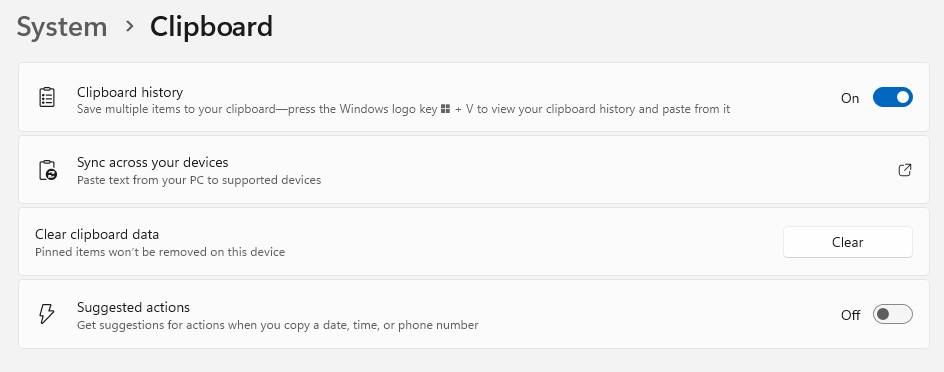
turn off this suggested actions
7ad7f14a65906b7ddd57b35d40c85d3c.png


it fucks with the way you copy cells and large data and tab deliniated stuff
 
  • 1Like
Reactions: 1 user

Intrinsic

Person of Whiteness
<Gold Donor>
16,594
16,449
You say you use it for work, do you have any company/work network stuff installed? If so, it might be checking for data exfiltration or something like that.
No specific provisioning or anything. I’m self employed so use it across multiple clients / jobs. Having said that, OneDrive may be doing something funky? That’s the only type of “sync” I use across files, but all (most) these files are edited locally and not off a networked SharePoint copy. I use a VPN for any direct connection but that’s only for one client to log in and do invoicing bc they use a locally hosted Ajera program (which sucks balls).
 
  • 1Like
Reactions: 1 user

Intrinsic

Person of Whiteness
<Gold Donor>
16,594
16,449
oh this is easy

turn off this suggested actions
7ad7f14a65906b7ddd57b35d40c85d3c.png


it fucks with the way you copy cells and large data and tab deliniated stuff
Just saw you post while replying. I’ll check those out and see if it helps.

These were my settings:

1768229382338.png
 
Last edited: