Computer Issues

Lanx

<Prior Amod>
73,714
174,355
Currently assembling the new battle station and I'm having the damnedest time getting the AIO screws to thread into the AM5 bracket. It's almost like the screws are just spinning and I'm not keen on applying force on the bracket anymore than I already am. This is the Artic Liquid Freezer III 420mm.

Any suggestions?
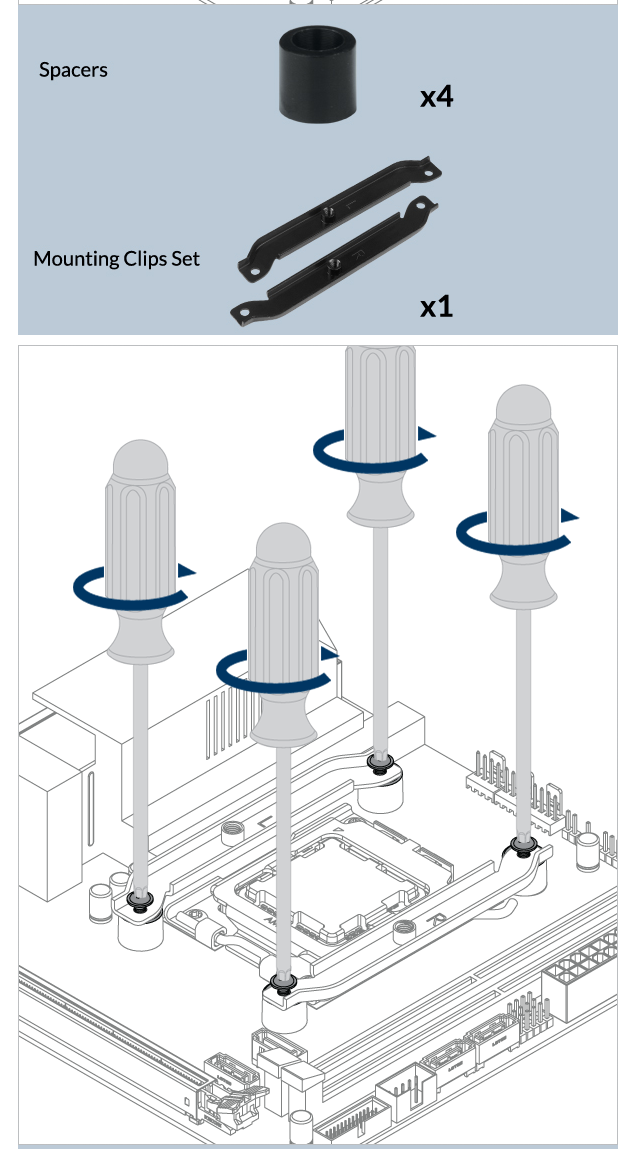
this part?
4841f28fc62a5f10cb5196111add85b3.png


are you pushing the back plate if its mounted in the case? or is the motherboard being assembled flat on the ground/cardboardbox

or is the the 2 screws, from aio to the l/r brackets?
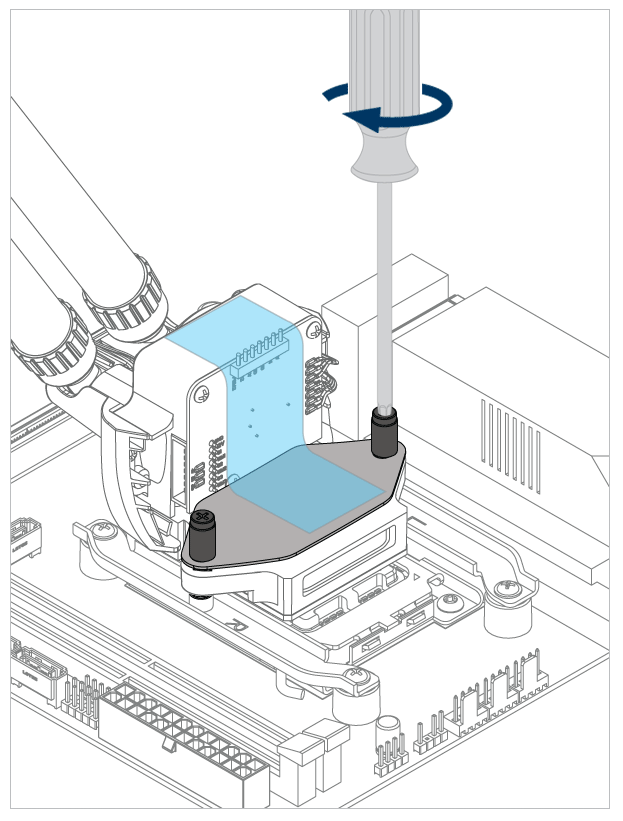
20d73911c89895f1d9a7313d3c20b97a.png
 

MusicForFish

Ultra Maga Instinct
<Prior Amod>
40,532
159,789
this part?
4841f28fc62a5f10cb5196111add85b3.png


are you pushing the back plate if its mounted in the case? or is the motherboard being assembled flat on the ground/cardboardbox

or is the the 2 screws, from aio to the l/r brackets?
20d73911c89895f1d9a7313d3c20b97a.png
The 2 from the AIO to the l/r brackets.

Figured it out. Backed off both screws, loosened the bracket a little on both sides, MacGivered each bracket to the screw and they both caught. Then alternated each screw. That could have been a better engineered install, smh.
 
Last edited:

Lanx

<Prior Amod>
73,714
174,355
The 2 from the AIO to the l/r brackets.

Figured it out. Backed off both screws, loosened the bracket a little on both sides, MacGivered each bracket to the screw and they both caught. Then alternated each screw. That could have been a better engineered install, smh.
here's to a successful bootup
093154b4f8056cca7588843ef2ec451e.png
 
  • 2Like
  • 1Solidarity
Reactions: 2 users

Srathor

Vyemm Raider
1,913
3,119
Fucking windows update. Nuked my sound off realtek system on Mobo and drivers don't recognise it (the windows version) yet. Grrrrr
 
  • 2Thoughts & Prayers
Reactions: 1 users

fred sanford

Sanford & Son: Owner, Operator
<Aristocrat╭ರ_•́>
1,981
5,985
Windows 10 help please

We've always had one login on our PC and I just had it set to auto login. Now that my kids are older, I created a separate login for each of them. I'm attempting to disable the auto login, but I can't get it to go away. Every time the computer comes up it auto logs in as the last person that was logged in. I'm guessing this is in part due to my not using passwords for the accounts. I just want a login page to come up where you click which user you want, and it goes in as that user.

On the user accounts dialog (netplwiz) I've checked the box stating that users must enter a password to use this computer

In the registry I've set the following to 0 or null: Computer\HKEY_LOCAL_MACHINE\SOFTWARE\Microsoft\Windows NT\CurrentVersion\Winlogon
  • AutoAdminLogin = 0
  • AutoLoginSID = blank
  • DefaulUserName = blank
  • LastUsedUsername = blank
I've also verified that Fast Startup is disabled in my power options as apparently that can affect this.

Edit: I just set all the user account passwords to something, rebooted it, and it works the way I intended except we have to enter a password. Does anyone know a way to do it with blank passwords?
 
Last edited:

Hekotat

FoH nuclear response team
12,951
13,147
Not really a desktop question but I don't know where else to put it and I don't want to create a thread for such a insigificant question that is driving me nuts.

I've got an Ipad which I use to watch youtube on ocassionally. There has recently been an updated and I'm unable to refresh the content on the main page without closing and re-opening the app. Before I could just swipe down and it would refresh with new content.

Google hasn't been helpful in my searches and wonder if anyone is having similar issues or knows how to fix Apple's retarded shit.
 

Kajiimagi

<Aristocrat╭ರ_•́>
4,211
7,897
Not really a desktop question but I don't know where else to put it and I don't want to create a thread for such a insigificant question that is driving me nuts.

I've got an Ipad which I use to watch youtube on ocassionally. There has recently been an updated and I'm unable to refresh the content on the main page without closing and re-opening the app. Before I could just swipe down and it would refresh with new content.

Google hasn't been helpful in my searches and wonder if anyone is having similar issues or knows how to fix Apple's retarded shit.
Did you try uninstalling / reinstalling? Just a guess.
 

Lanx

<Prior Amod>
73,714
174,355
Not really a desktop question but I don't know where else to put it and I don't want to create a thread for such a insigificant question that is driving me nuts.

I've got an Ipad which I use to watch youtube on ocassionally. There has recently been an updated and I'm unable to refresh the content on the main page without closing and re-opening the app. Before I could just swipe down and it would refresh with new content.

Google hasn't been helpful in my searches and wonder if anyone is having similar issues or knows how to fix Apple's retarded shit.
my wife had some kind of issue too w/ it was either spotify or youtube or both,

check this is on
Settings > General > Background App Refresh

and go into each app, in applications and double check the "update over wifi/cellular" is appropriate

and try clear cache, other than that reinstall
 

Rajaah

Honorable Member
<Gold Donor>
14,709
21,386
What fresh hell is this? Just got this laptop barely more than a year ago (Summer 2024) and it's already having issues. Every couple hours this weekend it'll suddenly reboot and then pop back up with these messages. I hit the power button on and off and it starts up normally. Might be happening with increasing frequency, not sure.

PXL_20251013_040510782.jpg

PXL_20251013_130356965.MP.jpg

Any idea how I can get this to stop happening without spending hundreds of dollars bringing it to a repair shop?
 
Last edited:

Lanx

<Prior Amod>
73,714
174,355
What fresh hell is this? Just got this laptop barely more than a year ago (Summer 2024) and it's already having issues. Every couple hours this weekend it'll suddenly reboot and then pop back up with these messages. I hit the power button on and off and it starts up normally. Might be happening with increasing frequency, not sure.

View attachment 605492
View attachment 605493
Any idea how I can get this to stop happening without spending hundreds of dollars bringing it to a repair shop?
why there hell is there pictures of hair

when that happens, it's usually a windows error, drivers/ update, weird program

start saving your important files and reformat fresh imo
 

Malakriss

Golden Baronet of the Realm
13,099
12,469
The Windows 11 patch error that resulted in not being able to detect hard drives was because of outdated BIOS and firmware, if it is anything similar to that update your hard drive and mobo software. If you are AMD specifically make sure the AGESA is up to date.
 
  • 1Like
Reactions: 1 user

Rajaah

Honorable Member
<Gold Donor>
14,709
21,386
why there hell is there pictures of hair

when that happens, it's usually a windows error, drivers/ update, weird program

start saving your important files and reformat fresh imo

Because I'd just taken it out of a dusty bag and was in the car. It's crazy how fast screens get dirty when they're in a bag or a box with a lot of dust. It probably isn't spotless even at the best of times either

If all else fails I'll do a full backup/format but it'd be a pretty big hassle at this moment.

The Windows 11 patch error that resulted in not being able to detect hard drives was because of outdated BIOS and firmware, if it is anything similar to that update your hard drive and mobo software. If you are AMD specifically make sure the AGESA is up to date.

AMD Ryzen, si.

I've got Windows 11 already and I don't think this one actually did the patch, unless it happened while I was asleep.

This is available:

1760387253135.png


1760387565736.png

I'll check the AGESA out, and do that available update, and hopefully no further incidents happen.
 

Kajiimagi

<Aristocrat╭ರ_•́>
4,211
7,897
FYI gang, AMD released a new video driver today. This could just be me but I had to roll back as it was costing me about 15% FPS on my AMD 7900 XTX. Maybe they added new fancy features for the 9070 XT card and to hell with the old generation, I dunno.
 

Burren

Bronze Baronet of the Realm
5,556
8,740
Pretty critical issue I just ran into with new (5 month old) desktop. Not sure I'll do a good job explaining, but I'm at a loss.

I was playing a Steam game earlier today and all of a sudden the mouse cursor disappeared from the game and moving the mouse moved the game screen. But, no visible cursor. Had to Control/ALT/Delete to get task manager and close the program.
Restart game, worked for about 15 minutes, then it did it again.
Restart computer and game.
Worked a little, then same again.

Downloaded updated MOBO drivers. Downloaded updated video drivers.
Now the mouse will NOT left-click on anything, so I'm dead in the water.
Tried different ports plugging the mouse in. Nothing.
Tried a different mouse entirely, same problem; cannot left click and open any file or start any program.

Clearly its a computer issue and not a mouse issue, but now I can't even use the mouse to fix things, if I knew what to fix.

Anyone have ideas?

**Program icons are also not highlighted when you mouse over them, like they used to be. I managed to get into "devises > mouse" using the keyboard and every option is correct there as well**
 
Last edited:

Lanx

<Prior Amod>
73,714
174,355
Pretty critical issue I just ran into with new (5 month old) desktop. Not sure I'll do a good job explaining, but I'm at a loss.

I was playing a Steam game earlier today and all of a sudden the mouse cursor disappeared from the game and moving the mouse moved the game screen. But, no visible cursor. Had to Control/ALT/Delete to get task manager and close the program.
Restart game, worked for about 15 minutes, then it did it again.
Restart computer and game.
Worked a little, then same again.

Downloaded updated MOBO drivers. Downloaded updated video drivers.
Now the mouse will NOT left-click on anything, so I'm dead in the water.
Tried different ports plugging the mouse in. Nothing.
Tried a different mouse entirely, same problem; cannot left click and open any file or start any program.

Clearly its a computer issue and not a mouse issue, but now I can't even use the mouse to fix things, if I knew what to fix.

Anyone have ideas?
sounds like you might have mouse drivers fucked

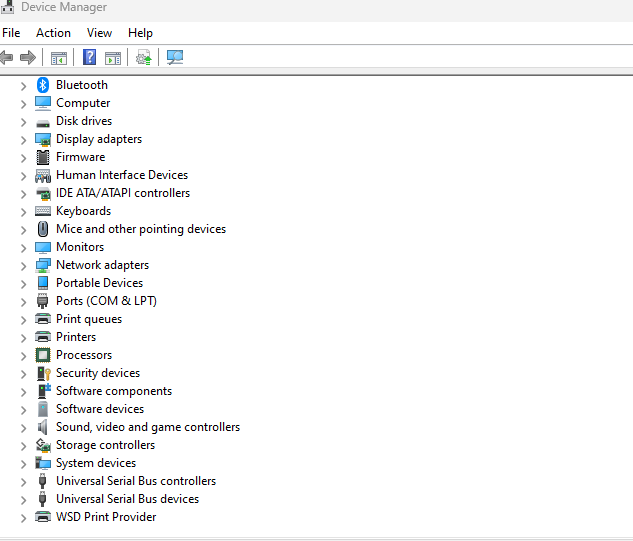
completely on keyboard do windowskey+r
type
device manager
enter
4fef6da335dda9c9bf29cdc06991e8f3.png

press tab

and you should be in the list with a dark bar

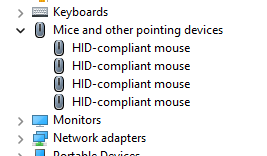
hit down until you land on mice

then hit right to expand the mice menu
61ee0ca47ef79a97fb45fb17c7693aac.png


hit delete on everything and reboot and windows should reinstall mice drivers


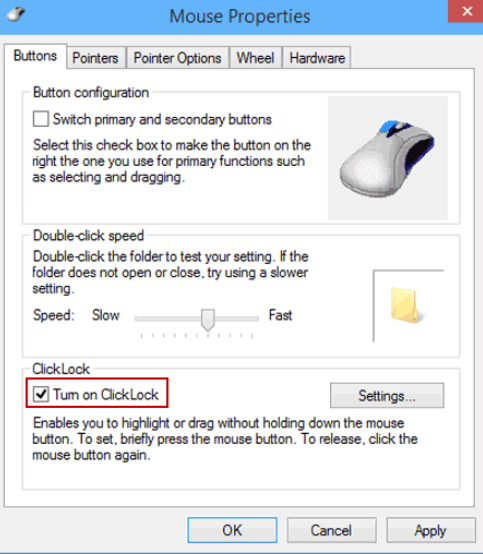
i mean it sounds like you might have a clicklock issue
ded2bc146085b13c2915c719271d260c.png

i had something like this happen a while ago, and just turned it off, no idea why it on in the first place, and no idea how youre gonna get to it without a mouse