Computer Issues

Daidraco

<Gold Donor>
11,202
12,100
I keep running into virtual/physical ram issues, especially when playing graphically intense games. My page file size will creep up and games will start to stutter pretty badly. I've been monitoring it with HWiNFO and the spikes are pretty bad. It doesn't happen in every game, but often enough that it's frustrating. I've tried changing my page file size, disabling shitloads of windows services, etc.

AMD 9700XT graphics card, 7800x3D processor, and 32GB of DDR5 6k RAM.
Troubleshoot it with us. Check on the stability of the Ram first. Use something like MemTest86 and run that for a couple passes at least.
 
  • 1Like
Reactions: 1 user

Rajaah

Honorable Member
<Gold Donor>
15,558
22,986
My computer is basically out of hard drive space and I'm not sure why. I've been consolidating a lot of old files from previous computers, which took up a lot of my hard drive space, but a lot more space disappeared than what I'm using. Once I got below 30 GB I stopped putting anything on this computer, and the space kept dwindling. Actually got to zero available space last night, and moved a lot of stuff onto an external USB drive (about 100 GB worth). Within an hour or so I noticed I was back down to about 5 GB available, where it sat ever since (though I somehow lost another half a GB in the last few hours, it's 4.55 GB now). I've got a ripped movie folder that's like 300 GB and I can get an external drive to move that and whatever else off this computer, except that at this point there isn't really anything besides that folder that is taking up space. Seriously, all of my emulator folders combined are probably like 3 GB, and there isn't much else. This is a 1 TB hard drive and I don't know what's taking up about 650 of that. If I do get an external drive and move all of the movies onto it, I suspect the regained 300 GB will start dwindling as well for no apparent fucking reason and I'll be back at 4.55 GB in a few days. I do seem to get some space back when I reboot, but it disappears again before long.

No viruses that I know of, everything works fine. I'll say this though, there are two possible culprits springing to mind:

One, I've been working on editing together videos in Pinnacle Studio, and this involves the program importing tons of large files. I think it might be copying all of them into an unknown folder somewhere. It shouldn't be, because it's running off of the original files after it imports them (i.e. if I delete a video file that Pinnacle is using in some way for a project, it'll also become a defunct section of the project...if it's copying everything to some folder, it wouldn't do that). All I know for sure is that every time I use Pinnacle Studio, I seem to end up with significantly less hard drive space. Unless that's just happening anyway and Pinnacle happens to be what I'm using.

Two, I have a metric fuck-ton of internet tabs and windows open currently. Like an astronomical, ridiculous amount. 15 windows and around 2000 tabs, with each window having anywhere from 20 tabs to 300 tabs. Things got out of control while working on various projects over the past few months, especially with my recent time off. Haven't gotten around to doing tab clean-up, it's easier to just open a new window if I need a specific category to be organized. So a ton of my tabs are redundant as well. It would take some time to go through and close all the unnecessary tabs. Could probably take some of the windows and mass-bookmark them (in case) and close them; I'm guessing only about half of the open windows are even being referred to at all by me.

All of that said, the computer speed hasn't really slowed down at all at any point, most of the tabs are asleep at any given time, and working on this computer, you really wouldn't know that a large volume of things are open unless I told you. I suspect the problem is being caused by Pinnacle somehow.

 
  • 1WTF
  • 1Mother of God
Reactions: 1 users

Lanx

<Prior Amod>
76,897
181,350
My computer is basically out of hard drive space and I'm not sure why. I've been consolidating a lot of old files from previous computers, which took up a lot of my hard drive space, but a lot more space disappeared than what I'm using. Once I got below 30 GB I stopped putting anything on this computer, and the space kept dwindling. Actually got to zero available space last night, and moved a lot of stuff onto an external USB drive (about 100 GB worth). Within an hour or so I noticed I was back down to about 5 GB available, where it sat ever since (though I somehow lost another half a GB in the last few hours, it's 4.55 GB now). I've got a ripped movie folder that's like 300 GB and I can get an external drive to move that and whatever else off this computer, except that at this point there isn't really anything besides that folder that is taking up space. Seriously, all of my emulator folders combined are probably like 3 GB, and there isn't much else. This is a 1 TB hard drive and I don't know what's taking up about 650 of that. If I do get an external drive and move all of the movies onto it, I suspect the regained 300 GB will start dwindling as well for no apparent fucking reason and I'll be back at 4.55 GB in a few days. I do seem to get some space back when I reboot, but it disappears again before long.

No viruses that I know of, everything works fine. I'll say this though, there are two possible culprits springing to mind:

One, I've been working on editing together videos in Pinnacle Studio, and this involves the program importing tons of large files. I think it might be copying all of them into an unknown folder somewhere. It shouldn't be, because it's running off of the original files after it imports them (i.e. if I delete a video file that Pinnacle is using in some way for a project, it'll also become a defunct section of the project...if it's copying everything to some folder, it wouldn't do that). All I know for sure is that every time I use Pinnacle Studio, I seem to end up with significantly less hard drive space. Unless that's just happening anyway and Pinnacle happens to be what I'm using.

Two, I have a metric fuck-ton of internet tabs and windows open currently. Like an astronomical, ridiculous amount. 15 windows and around 2000 tabs, with each window having anywhere from 20 tabs to 300 tabs. Things got out of control while working on various projects over the past few months, especially with my recent time off. Haven't gotten around to doing tab clean-up, it's easier to just open a new window if I need a specific category to be organized. So a ton of my tabs are redundant as well. It would take some time to go through and close all the unnecessary tabs. Could probably take some of the windows and mass-bookmark them (in case) and close them; I'm guessing only about half of the open windows are even being referred to at all by me.

All of that said, the computer speed hasn't really slowed down at all at any point, most of the tabs are asleep at any given time, and working on this computer, you really wouldn't know that a large volume of things are open unless I told you. I suspect the problem is being caused by Pinnacle somehow.

it's better than the old standard windirstat which was already super fast

of course wiztree is for you to know where shit is going and hiding and manually deleting, if you want something automatic, something like ccleaner will do
 
  • 2Like
Reactions: 1 users

Rajaah

Honorable Member
<Gold Donor>
15,558
22,986
1781272211518.png

Da fuq is this? Pretty much everything on my desktop is walled off. Looked it up and it's something called "Onedrive" that I never asked for. However, my computer doesn't seem to even have Onedrive on it. Looking it up online, everything says to just go sync Onedrive, but I can't do that if it isn't on the computer.

On the bright side, I'm down to about 450 open tabs out of the 2000+ I had a month ago.
 
  • 1WTF
Reactions: 1 user

Denamian

Night Janitor
<Nazi Janitors>
7,966
22,224
View attachment 631090
Da fuq is this? Pretty much everything on my desktop is walled off. Looked it up and it's something called "Onedrive" that I never asked for. However, my computer doesn't seem to even have Onedrive on it. Looking it up online, everything says to just go sync Onedrive, but I can't do that if it isn't on the computer.

On the bright side, I'm down to about 450 open tabs out of the 2000+ I had a month ago.
How the fuck have you never heard of the cancer that is OneDrive? It's Microsoft's cloud storage and it's integrated into windows unless you very intentionally disable it.

If you have in to one of the backup windows notifications, you sent a bunch of your files to Microsoft via OneDrive. It like to then remove those files from your computer and just leave links where they once were, so you have to download them in order to access them on your computer again.
 
  • 1Like
Reactions: 1 user

Lanx

<Prior Amod>
76,897
181,350
How the fuck have you never heard of the cancer that is OneDrive? It's Microsoft's cloud storage and it's integrated into windows unless you very intentionally disable it.

If you have in to one of the backup windows notifications, you sent a bunch of your files to Microsoft via OneDrive. It like to then remove those files from your computer and just leave links where they once were, so you have to download them in order to access them on your computer again.
i mean what onedrive did to Rajaah Rajaah , is how they get you on the hook for a onedrive+ or whatever, ha

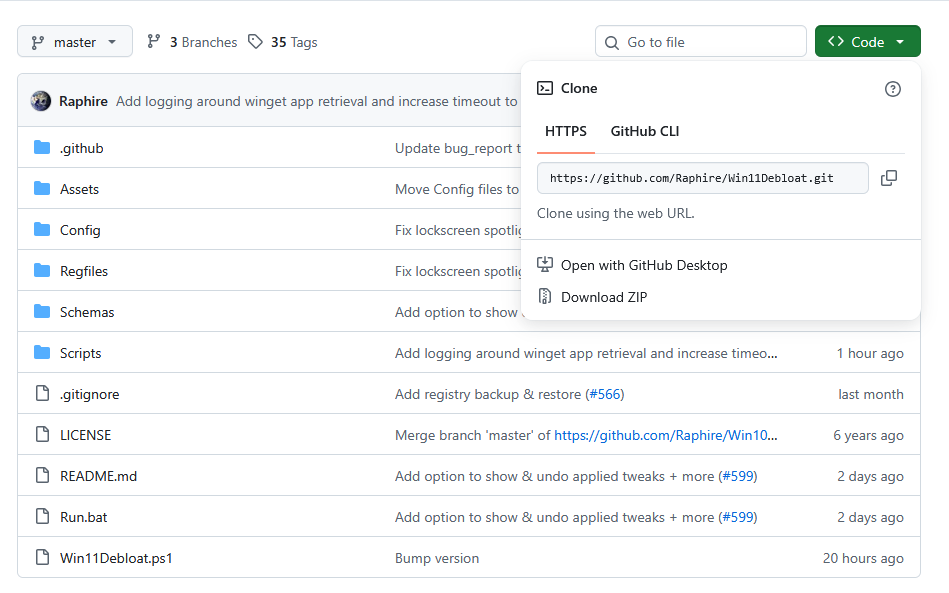
Rajaah Rajaah , after you fix your shit go run windebloat to get rid of junk
 
  • 1Like
Reactions: 1 user

Rajaah

Honorable Member
<Gold Donor>
15,558
22,986

it's better than the old standard windirstat which was already super fast

of course wiztree is for you to know where shit is going and hiding and manually deleting, if you want something automatic, something like ccleaner will do

That sorted it. There's a "scratch" folder in Pinnacle Studio where it was keeping copies of pretty much every video or sound file I ever imported or edited, and it had swelled to mega proportions. Figured it was related to that program because every time I used it, my free space would dwindle much faster afterwards.

1781280821691.png

That freed up half of the drive space, hopefully it doesn't continue to hemorrhage memory.
 

Rajaah

Honorable Member
<Gold Donor>
15,558
22,986
How the fuck have you never heard of the cancer that is OneDrive? It's Microsoft's cloud storage and it's integrated into windows unless you very intentionally disable it.

If you have in to one of the backup windows notifications, you sent a bunch of your files to Microsoft via OneDrive. It like to then remove those files from your computer and just leave links where they once were, so you have to download them in order to access them on your computer again.

OneDrive really is cancer. No option to re-download anything. Right clicking just shows normal file options. There's no OneDrive icon anywhere to right click either, just a folder with the whole desktop in it. Attempting to copy anything just results in a "can't copy, the cloud data provider is not running" (or something along those lines) message.

Best I can do is bring up the folder in a command line. Tried /reset through that but it doesn't do anything.

This is some bullshit, moving all my stuff and leaving links that I can't do anything with. Reminds me of Nintendo's "key card" bullshit that they later dropped.
 

Lanx

<Prior Amod>
76,897
181,350
OneDrive really is cancer. No option to re-download anything. Right clicking just shows normal file options. There's no OneDrive icon anywhere to right click either, just a folder with the whole desktop in it. Attempting to copy anything just results in a "can't copy, the cloud data provider is not running" (or something along those lines) message.

Best I can do is bring up the folder in a command line. Tried /reset through that but it doesn't do anything.

This is some bullshit, moving all my stuff and leaving links that I can't do anything with. Reminds me of Nintendo's "key card" bullshit that they later dropped.
i just gave you a link to remove it
 

Rajaah

Honorable Member
<Gold Donor>
15,558
22,986
i just gave you a link to remove it

Not having any luck with that. There's no zip to download the program on there, I ran the Powershell command line to get it installed that way and it just went around in a circle with nothing installed at the end. Get.ps1 doesn't work either. Don't have time to fool with this right now unfortunately. Far as I can tell, I don't have a Onedrive to remove, it's nowhere to be found on the computer. These files are just cloud-saved on something I can't sync to or download from. I'll have to deal with it later.

Microsoft needs to get out of their own way and just leave people alone with all their forced apps and cloud saving and so forth. Clippy can go fuck himself!
 

Lanx

<Prior Amod>
76,897
181,350
Not having any luck with that. There's no zip to download the program on there, I ran the Powershell command line to get it installed that way and it just went around in a circle with nothing installed at the end. Get.ps1 doesn't work either. Don't have time to fool with this right now unfortunately. Far as I can tell, I don't have a Onedrive to remove, it's nowhere to be found on the computer. These files are just cloud-saved on something I can't sync to or download from. I'll have to deal with it later.

Microsoft needs to get out of their own way and just leave people alone with all their forced apps and cloud saving and so forth. Clippy can go fuck himself!
52c46f52dea2eed27cf1b6b575eda702.png
 

slippery

<Bronze Donator>
7,982
7,794
I'm having a serious brain fart at the moment. I'm giving someone a computer I haven't touched in a few years that was just sitting in my closet. I took out it, reinstalled windows and wiped everything. The only issue I'm having is RGB control (fucking RGB). Looking at it

Lian Li O11 Dynamic case
Corsair Vengeance ram
Lian Li Unifans
Aorus X570 Master mobo

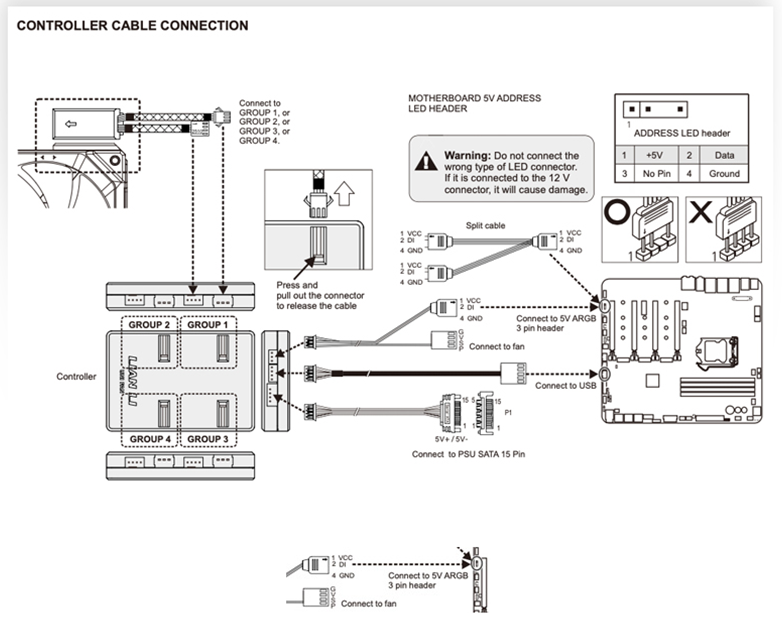
I can't for the life of me get rgb control of the fans. With RGB Fusion I can control the front panel strip rgb. L-Connect 3 doesn't show anything connected.

I think these are the original uni fans. There are 9 in the case. Looks like they are connected to a lian li uni fan hub, which is then connected to a fan header and an argb header.
 

MusicForFish

Ultra Maga Instinct
<Prior Amod>
46,397
185,294
I'm having a serious brain fart at the moment. I'm giving someone a computer I haven't touched in a few years that was just sitting in my closet. I took out it, reinstalled windows and wiped everything. The only issue I'm having is RGB control (fucking RGB). Looking at it

Lian Li O11 Dynamic case
Corsair Vengeance ram
Lian Li Unifans
Aorus X570 Master mobo

I can't for the life of me get rgb control of the fans. With RGB Fusion I can control the front panel strip rgb. L-Connect 3 doesn't show anything connected.

I think these are the original uni fans. There are 9 in the case. Looks like they are connected to a lian li uni fan hub, which is then connected to a fan header and an argb header.
Do they show in signal?
 

Lanx

<Prior Amod>
76,897
181,350
I'm having a serious brain fart at the moment. I'm giving someone a computer I haven't touched in a few years that was just sitting in my closet. I took out it, reinstalled windows and wiped everything. The only issue I'm having is RGB control (fucking RGB). Looking at it

Lian Li O11 Dynamic case
Corsair Vengeance ram
Lian Li Unifans
Aorus X570 Master mobo

I can't for the life of me get rgb control of the fans. With RGB Fusion I can control the front panel strip rgb. L-Connect 3 doesn't show anything connected.

I think these are the original uni fans. There are 9 in the case. Looks like they are connected to a lian li uni fan hub, which is then connected to a fan header and an argb header.
just to sense check
bda80b0b92d638183b07e1b3640c5a13.png
 

MusicForFish

Ultra Maga Instinct
<Prior Amod>
46,397
185,294
Signal?

Yes, does appear to be the case. I guess for clarity sake, they are all working and spinning, and the rgb on all of them is on (default rotating whatever all the lights on). I'm just trying to gain control of them for the sake of turning the lights off, or to just a static color, or something.

Using this allowed me to regain control of the rbg headers that weren't being detected, though it took a little while. Might be worth while to check it out.
 

Lanx

<Prior Amod>
76,897
181,350
Signal?

Yes, does appear to be the case. I guess for clarity sake, they are all working and spinning, and the rgb on all of them is on (default rotating whatever all the lights on). I'm just trying to gain control of them for the sake of turning the lights off, or to just a static color, or something.
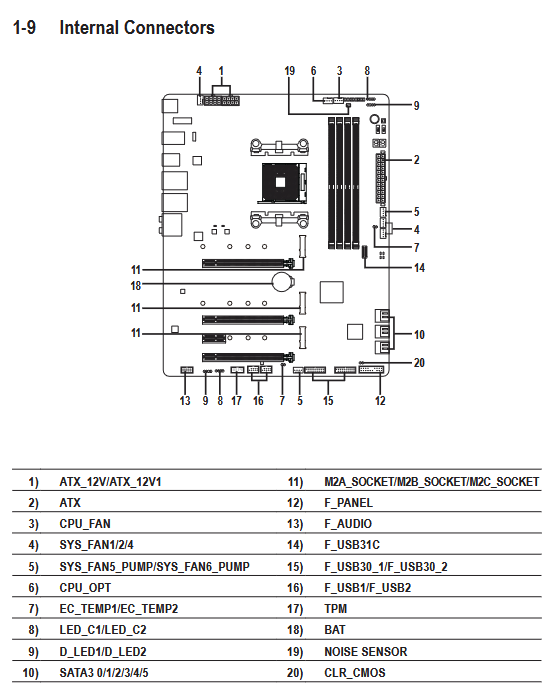
so you are using d)led1 (the one w/ the missing ping)

there are also two spots for argb in the mobo, upper right and lower left

would that have anything to do with this?

386ccea562fc0663250432e15cec518b.png


(8 and 9)
(well you wouldn't be using 8)
 

slippery

<Bronze Donator>
7,982
7,794
so you are using d)led1 (the one w/ the missing ping)

there are also two spots for argb in the mobo, upper right and lower left

would that have anything to do with this?

386ccea562fc0663250432e15cec518b.png


(8 and 9)
(well you wouldn't be using 8)
D_LED1 on the bottom left

I do know all this stuff did work previously, I have a feeling it's software related. Something changed in the intermittent years and their new software isn't working with the old.

I'll have to try singalrgb later and see if maybe that just works aroudn it
 

Kajiimagi

<Aristocrat╭ರ_•́>
5,396
9,858
Don't think L_connect 3 works on gen 1 unifans, you may need to DL an older version. As I recall, their site was hot garbage for finding stuff.