Computer Issues

Control

Golden Baronet of the Realm
5,549
15,681
Little annoying issue popping up on my desktop I use for work that I haven’t really tried to figure out yet. It is my old gaming PC that I moved over to work desk when I updated to my 9800X3D and 9070XT. So this one is i7 and 3080 TI.

Anyways, I do a lot of copy and paste between Excel, PowerBI, Smartsheet, Word, etc. it isn’t often large things, happens with a single cell contents. But very often the whole computer lags for like 8 seconds as soon as I CTRL + C. It happens frequently enough that it makes working almost unbearable. All I can correlate it with is that usually it happens when I’m watching Netflix or some embedded media in another tab. Almost always have something in in the background. Doesn’t happen with audio (YouTube music / Spotify).

My other evidence of video / streaming related is that when it in hangs I have to refresh the browser to continue watching the video.

It is Windows 10 LTSC or whatever it is called and Edge browser.

You say you use it for work, do you have any company/work network stuff installed? If so, it might be checking for data exfiltration or something like that.
 

Lanx

<Prior Amod>
75,301
178,034
Little annoying issue popping up on my desktop I use for work that I haven’t really tried to figure out yet. It is my old gaming PC that I moved over to work desk when I updated to my 9800X3D and 9070XT. So this one is i7 and 3080 TI.

Anyways, I do a lot of copy and paste between Excel, PowerBI, Smartsheet, Word, etc. it isn’t often large things, happens with a single cell contents. But very often the whole computer lags for like 8 seconds as soon as I CTRL + C. It happens frequently enough that it makes working almost unbearable. All I can correlate it with is that usually it happens when I’m watching Netflix or some embedded media in another tab. Almost always have something in in the background. Doesn’t happen with audio (YouTube music / Spotify).

My other evidence of video / streaming related is that when it in hangs I have to refresh the browser to continue watching the video.

It is Windows 10 LTSC or whatever it is called and Edge browser.
oh this is easy

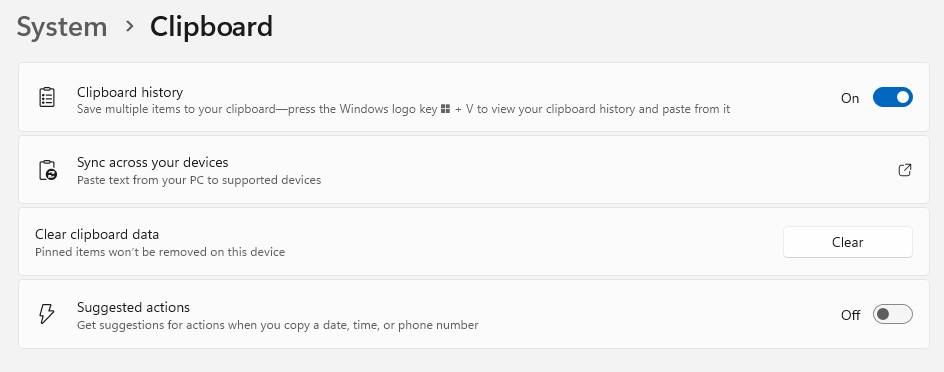
turn off this suggested actions
7ad7f14a65906b7ddd57b35d40c85d3c.png


it fucks with the way you copy cells and large data and tab deliniated stuff
 
  • 1Like
Reactions: 1 user

Intrinsic

Person of Whiteness
<Gold Donor>
16,858
16,991
You say you use it for work, do you have any company/work network stuff installed? If so, it might be checking for data exfiltration or something like that.
No specific provisioning or anything. I’m self employed so use it across multiple clients / jobs. Having said that, OneDrive may be doing something funky? That’s the only type of “sync” I use across files, but all (most) these files are edited locally and not off a networked SharePoint copy. I use a VPN for any direct connection but that’s only for one client to log in and do invoicing bc they use a locally hosted Ajera program (which sucks balls).
 
  • 1Like
Reactions: 1 user

Intrinsic

Person of Whiteness
<Gold Donor>
16,858
16,991
oh this is easy

turn off this suggested actions
7ad7f14a65906b7ddd57b35d40c85d3c.png


it fucks with the way you copy cells and large data and tab deliniated stuff
Just saw you post while replying. I’ll check those out and see if it helps.

These were my settings:

1768229382338.png
 
Last edited:

Sludig

Potato del Grande
11,518
12,379


Cross posting for visibility.

Memtest, will it boot straight to mem test from usb or do I need to go into BIOS and then one of the things I was yelled at by someone else is that I should change boot order rather than clicking the drive directly that seems to instantly boot via whatever I clicked which is what I had done when trying to load the windows USB before. Currently SSD doesn't show as a bootable drive with no functioning windows, thread has more detailed info.


I am looking at doing a rebuild with keeping my important parts if they test good as far as I can tell. GPU, SSD, ram, maybe the PSU.

But looking at suggested CPU/mobo, think I'm ready to go with amd, unless 13/14th gen issues are sorted out.
 

jeffvader

it's only castles burning
405
33
Hey gurus, admittedly my setup is old. I'm beginning to have trouble booting up. Desktop is sometimes unresponsive after loading and some black screen flashes. can anyone help me with a couple quick fixes to check or am I screwed and should just rebuild?
 

Lanx

<Prior Amod>
75,301
178,034
Meant to include this ss
is that i7 over 10 years old? that chip can click yes to facebook TOS?

if youre rebooting/stuck at startup and your pc is over 5years old your thermal paste is most likely dried out

can some spray can air
open up your pc clean until the can is empty, maybe use a second can

then get iso alcohol, take off the cooler, wipe down the cooler and the cpu, and apply new paste

i was just informed mx7 is out so here
ARCTIC MX-7 (4 g) - Ultimate Performance Thermal Paste for CPUs, Consoles, Graphics Cards, Laptops, Processors, Very High Thermal Conductivity, Long Durability, Non-Conductive, Non-Capacitive

put a pea sized drop on and reapply